
TweakWare Settings & Host For MTN 0.00K Free Browsing
Today, you will see the Full settings of MTN 0.00k for Tweakware VPN on Android. I have decided to let the cat out of the bag, no more locked settings here is the host and proxy, many more settings for other VPN Coming.
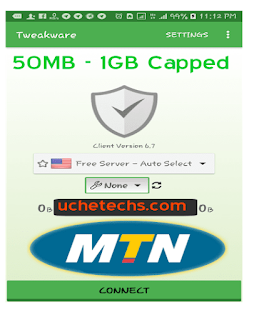
MTN Free Browsing Settings for Tweakware is easy, follow the tutorial below carefully and you can set up your own custom settings for Tweakware VPN and if you are smart enough, you should know how to set the rest upon any VPN.
MTN Free Browsing Tweakware Info
2. Click Settings
3. Click Custom Tweak
4. Select Connection Mode;
- HTTP

5. Server Port;
- 8080
6. Host Header;
- mtn1app.mtn.com
7. Select Header Line Type
- Singleline
8. Proxy Host
- 10.199.212.2
9. Proxy Port
- 8080
10. Go back to home screen and Select Tweak
- Custom
CONNECT and enjoy!
This MTN Free browsing cheat is capped at 50MB daily. Every day you are entitled to 50MB, ones exhausted for the day, it wouldn't connect. Use wisely. Enjoy!

MTN Free Browsing Settings for Tweakware is easy, follow the tutorial below carefully and you can set up your own custom settings for Tweakware VPN and if you are smart enough, you should know how to set the rest upon any VPN.
MTN Free Browsing Tweakware Info
- Android device
- MTN Sim
- N0.00k SIM
- Tweakware VPN
TweakWare Settings For MTN Free Browsing
1. Open Tweakware App2. Click Settings
3. Click Custom Tweak
4. Select Connection Mode;
- HTTP

5. Server Port;
- 8080
6. Host Header;
- mtn1app.mtn.com
7. Select Header Line Type
- Singleline
8. Proxy Host
- 10.199.212.2
9. Proxy Port
- 8080
10. Go back to home screen and Select Tweak
- Custom
CONNECT and enjoy!
See Also: MTN Unlimited Free Internet via Tweakware VPN
Video Tweakware VPN Settings MTN Cheat
This MTN Free browsing cheat is capped at 50MB daily. Every day you are entitled to 50MB, ones exhausted for the day, it wouldn't connect. Use wisely. Enjoy!


Testing
ReplyDeleteMy tweakware worked perfectly the first day I did it, but since then, it is not working again, please help me out
ReplyDeleteIt is capped 50MB Daily, the next day, you'll be given another 50MB
Deletenot working
ReplyDeleteThis is 50MB host, still working, i guess you didn't set it well
DeleteWhat is the expiring date of the mtn tweak or it doesn't expire unlike the files we use?
ReplyDeleteHi Ugochukwu, It doesn't have any expiration date
DeleteHmmmmmmmmm please they have block most VPN hope it gonna work on this app
ReplyDeleteWhy not try it and Give feedback
DeleteI can't c d file anywhere
ReplyDeleteLol, so you didn't read the post, you are just looking for the File download link.
DeleteBy the way, the post is all about the Full Settings and not the locked file that can be imported, so right now, you have to read the post to set it up.
mine is not connecting. its saying invalid username and password bthen it will pop up disconnected
ReplyDeleteI guess you added username and password on Tweakware, remove it and try again. How did you even add that, there was nothing like that mentioned in this article. Chaii
DeleteHello sir how will i have a #0.00k sim,i still have like #0.23k,how do i get it away
ReplyDeleteYou can use the SIM, just make sure you don't have any MB, that's all. If you do, MTN Might use the whole data first.
DeleteI hve been trying to connect but it not connecting
ReplyDelete