
How To Convert Text to Audio / Speech in Windows Using Notepad
Did you know that you can convert Text into Audio in your Windows Pc using Notepad without downloading any software?

Converting of Text files to Audio without software works very easy and doesn't need any advance Pc trick. This is one of the popular features in a document right now, so learn how you can convert text to audio using notepad yourself.
Notepad has so many features and advances tricks which you can use for so many things. Notepad has so many viruses and is more dangerous than some commands in cmd.
We use notepad becuase many text editor out there isn't working as we expected, so I have decided to show you how to create a text to speech output. Now you know what notepad can do apart from just saving text and crashing systems using.Bat.
This steps below will make it easy for your Windows Pc to speak out loud what you type.
1. Open Notepad on Your Windows 10 or 7 Pc
2. Now Copy or download this Program and Paste in your Windows Pc

- Download Code
Credits: prophethacker – All rights reserved.
4. Paste it in Notepad and save as .hta rather than .txt.

5. Head to the location you saved the file and double-click it.
6. Now type what you want and you will hear what you are typed ones you click listen.
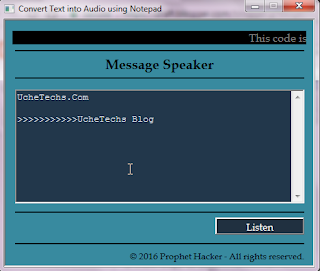
This is how to Convert Text to Audio using Notepad.
Don't forget to share!
Read Also:

Converting of Text files to Audio without software works very easy and doesn't need any advance Pc trick. This is one of the popular features in a document right now, so learn how you can convert text to audio using notepad yourself.
Use Notepad to Convert Text to Speech
Notepad has so many features and advances tricks which you can use for so many things. Notepad has so many viruses and is more dangerous than some commands in cmd.
We use notepad becuase many text editor out there isn't working as we expected, so I have decided to show you how to create a text to speech output. Now you know what notepad can do apart from just saving text and crashing systems using.Bat.
This steps below will make it easy for your Windows Pc to speak out loud what you type.
1. Open Notepad on Your Windows 10 or 7 Pc
2. Now Copy or download this Program and Paste in your Windows Pc

- Download Code
Credits: prophethacker – All rights reserved.
See Also... Remove a Login Password From Windows 10 startup3. After you have downloaded or copied the code from the .hta format
4. Paste it in Notepad and save as .hta rather than .txt.

5. Head to the location you saved the file and double-click it.
6. Now type what you want and you will hear what you are typed ones you click listen.

This is how to Convert Text to Audio using Notepad.
Don't forget to share!
Read Also:


Comments