
How To Remove Virus From Pendrive On Windows 10 Using CMD
Viruses are pretty bad and can damage your PC or even your Pendrive / Memory card. Practically any Drive can be damaged and all files and documents you have will be damaged and destroyed. That is why I have provided the post on how you can remove virus or shortcut virus using CMD.

There are many types of computer viruses and they have different ways of operating. When a computer has been infected with viruses, it can damage your PC, delete important files and even give hackers access to your confidential information.
Most times, it can be hard to know if your computer has a virus. This is so because of the types that exist. There is what they call Shortcut virus, this mostly carries the extension - exec or can be .exe. They can be hidden on a personal computer without you being aware of it. Examples are;
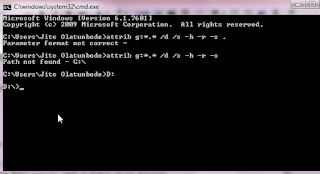
What i am about doing is to transfer an 'New Folder.exe' virus from a USB drive to D: drive and then delete the virus from the new place i kept it ( D: drive).
This is really a nice trick, i hope it was useful to you. Kindly share any other trick you know and don't forget to join our Facebook group.

There are many types of computer viruses and they have different ways of operating. When a computer has been infected with viruses, it can damage your PC, delete important files and even give hackers access to your confidential information.
Most times, it can be hard to know if your computer has a virus. This is so because of the types that exist. There is what they call Shortcut virus, this mostly carries the extension - exec or can be .exe. They can be hidden on a personal computer without you being aware of it. Examples are;
TYPES OF SHORTCUT VIRUSES
- Ravmon.exe
- New Folder.exe
- svchost.exe
- Heap41a
Remove Shortcut virus using CMD

- Go to Start > Run > cmd.
- Go to your pen drive memory cards or mobile phone directory.
- Now type: attrib g:*.* /d /s -h -r -s . ( Replace g: with the drive name of your drive)
- And then press Enter.
HOW TO REMOVE VIRUS FROM USB DRIVE
How to remove virus from USB drive, memory SD card via CMD in Windows 10What i am about doing is to transfer an 'New Folder.exe' virus from a USB drive to D: drive and then delete the virus from the new place i kept it ( D: drive).
- Open Command Prompt - Press WIN + R
- Type D: and press Enter.
- Type attrib and press Enter. You’ll see New Folder.exe virus listed.
- To remove virus using CMD, type into your command prompt attrib -r -a -s -h *.* and press Enter. This will remove the Read Only, Archive, System and hidden file attribute from all the files. (*.* for all the files with all different types of file extensions).
- Type del autorun.inf and enter, to delete the files.
This is really a nice trick, i hope it was useful to you. Kindly share any other trick you know and don't forget to join our Facebook group.


very nice article , heres also TOP 5 FREE ANTI VIRUS SOFTWARE
ReplyDeleteThis comment has been removed by a blog administrator.
ReplyDelete