
How To Make Command Prompt (CMD) Transparent Windows 10
Learn how to easily make Command Prompt cool by making the Cmd have a transparent background in Windows 7 and Windows 10.

Have you heard of Glass cmd? Don't worry we will come back to that. Now how to make the command prompt transparent by just changing it from settings with not Advanced command.
Windows 10 Transparent Command Prompt
With this method, you can make command prompt transparent without any software on your Pc. This feature works in 7 and Windows 10 easily by just changing the setting opacity from properties.
Read Also... Best Cmd Tricks you don't know
The below Pc Trick will give your Windows PC and Computer a cool look.
1. Open Cmd | Windows + R
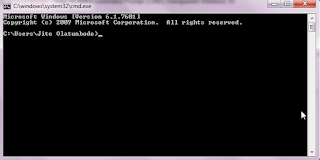
2. Type Cmd in the Popup menu
3. Open Cmd Properties in Window PC

4. Choose Colors section in command prompt and select properties.
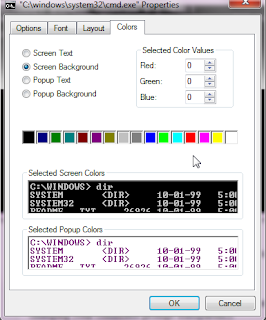
5. Scroll down and change the opacity value color to become transparent.
This is how to make your Windows 10 cmd to be transparent.
See Also: Hide Any Drive Using Command Prompt

Have you heard of Glass cmd? Don't worry we will come back to that. Now how to make the command prompt transparent by just changing it from settings with not Advanced command.
Windows 10 Transparent Command Prompt
With this method, you can make command prompt transparent without any software on your Pc. This feature works in 7 and Windows 10 easily by just changing the setting opacity from properties.
Read Also... Best Cmd Tricks you don't know
The below Pc Trick will give your Windows PC and Computer a cool look.
1. Open Cmd | Windows + R

2. Type Cmd in the Popup menu
3. Open Cmd Properties in Window PC

4. Choose Colors section in command prompt and select properties.

5. Scroll down and change the opacity value color to become transparent.
This is how to make your Windows 10 cmd to be transparent.
See Also: Hide Any Drive Using Command Prompt


Comments